MedeA JobServer & TaskServer - Indispensable for High Performance Computing
✓ Part of the standard MedeA Environment
At-a-Glance
The MedeA®[1] JobServer and TaskServer is the central unit to manage, monitor, and archive your calculations efficiently and consistently. Thanks to the MedeA JobServer and TaskServer, a highly flexible workflow maximizes productivity, even on systems with heterogeneous hardware, and different operating systems.
Key Benefits
Automated processing of compute protocols and workflows
Machine driven post-processing and results analysis of calculations with the following compute engines: VASP, LAMMPS, GIBBS, MOPAC, and Gaussian
Robust leveraging of compute resources from small-sized clusters to high performance computing systems
Reliable long-term archiving and accounting of computed data
MedeA has a unique three-tiered architecture: The MedeA GUI as the top tier, the JobServer as the middle tier, and the TaskServer as the bottom tier.
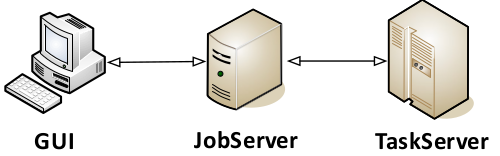
For smaller compute clusters, easily install a single central JobServer on a dedicated machine, and install TaskServers on the compute nodes. With this setup, submit calculations from one or more computers, which have the MedeA GUI installed. The MedeA JobServer and TaskServer have web interfaces to manage and monitor jobs, and restrict access if necessary.

Use the JobServer & TaskServer as a gateway for high performance computing in computer centers or the cloud. The JobServer & TaskServer support the most common load balancing systems such as SLURM, PBS/Torque, and GridEngine.

The MedeA JobServer and TaskServer automatically and reliably process your jobs and calculations while you are thinking about your next groundbreaking innovation in materials science.
Specifications
The MedeA JobServer & TaskServer require a 64-bit Intel or AMD architectures, and can be driven by various Windows or Linux operating systems. Oldest supported versions listed; newer versions also supported:
Windows: 10; Windows Server 2016
Linux: RHEL 8, CentOS/Rocky/Alma 8, Fedora 28, SUSE 15.4, Oracle 8.8, Debian 10, Ubuntu 20.04, Mint 20
Memory requirements: 1-4 GB RAM per compute core
Hard Drive space:
25 GB minimum for a full MedeA installation
60-180 GB for storing user generated data
Supported queuing (load balancing) systems are:
PBS/Torque
SLURM
GridEngine
LSF
Windows HPC
Key Features
Compute Management
Automated processing of compute protocols and workflows
Web interface designed for on-the-fly job monitoring: hold/resume, restart, etc.
Flexible administration of computer resources, even in heterogeneous systems
Developed for multi-user operation
Results & Data Management
Quick job search filters for users, status, title, and date
Efficient and consistent accounting of jobs and relevant files
Job index in an SQLite database while data is stored on disk
Full access to all input and output files for authorized users
Share results and workflows with a team
Security & Integrity
JobServer & TaskServer run as system services (daemons) for continuous access
Secure communication and access via HTTPS
User authentication restricts access and prohibits data vulnerability
Maintenance
JobServer updates and maintenance are possible without interrupting running calculations
Easy exchange of jobs and data between JobServers
Required Modules
MedeA Environment
Tightly Integrated Modules
MedeA Interface Builder
MedeA VASP
MedeA MOPAC
MedeA Gaussian GUI
MedeA GIBBS
MedeA Phonon
MedeA Transition State Search
MedeA Mechanical Properties (MT)
MedeA UNiversal CLuster Expansion (UNCLE)
MedeA HT-Launchpad
MedeA HT-Descriptors
MedeA Forcefield Optimizer
MedeA Diffusion
MedeA Thermal Conductivity
MedeA Viscosity
MedeA CED
MedeA Surface Tension
MedeA Electronics
Supported Modules
All MedeA modules
Find Out More
Learn more about submitting and monitoring computations in the MedeA Environment from our Webinar:
- download: